This site uses cookies for better user experience and analytics.
v1.0.11
Scream
What is it?
Scream is a versatile VST plugin that recreates the legendary Scream filter fromMassive, now available in any DAW. Known for its aggressive, resonant tone and raw energy, this filter has been a staple in electronic music for shaping basses, leads, and powerful sound design.
Scream isn’t just for basses. The filter can be applied to drums, synths, pads, and even vocals, unlocking textures that range from subtle saturation to intense screaming distortion. No matter your style, Scream fits seamlessly into your workflow. It comes fully compatible in VST3, CLAP, and AUv2, making it universal across all major DAWs.
Built-In Modulation Engine
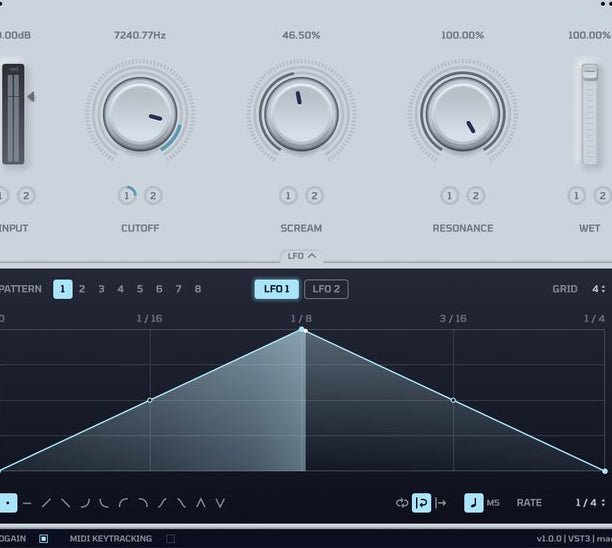
Forget tedious automation. Scream features an integrated LFO & Performer system that lets you easily draw complex modulations right inside the plugin. Create movement, sweeps, or expressive effects, all with an intuitive interface designed for speed and creativity.
Fast, Intuitive, & Lightweight
No bloated menus, no steep learning curve. Scream is designed with a clean interface that’s easy to learn, fast to use, and CPU-friendly Keeping your workflow smooth and your creativity flowing.
FREE & OPEN SOURCE
This is gonna change the game. Shoutout to CURE for cracking the code and letting us put the oldschool on the newschool!
— Dion Timmer
Scream brings back a sick combination of filters and saturation/distortion from the classic synths, genuinely one of the most unique textures you can get.
— Zetta
So glad this finally exists!
— Nyptane
The BEST feature of massive, outside of massive, honestly works amazing on melodic sounds too i love this fucking thing sm
— Marcix
i dreamed of this plugin one day existing for years and u twats made it free
— eupheeBeta Tester
the best
— Control Freak
It's extremely easy to use and the results you can get out of this are MINDBLOWING. It's so much fun tweaking the knobs and ending up with inspiring sounds!
— BassTi
The best way to bring old school sounds into the modern era.
— BleeveBeta Tester
I've been looking for the perfect scream filter forever... and I finally found it!
— 5 stepsBeta Tester
Development
Here we showcase the progress over the last year for each update.
IDEA
The Idea
We’ve always wanted the iconic 2010 Scream sound in a standalone external VST, but nothing like it existed. That’s where the idea for Scream began.
0.1.0
Gui Design
This update introduces the first pass of Scream’s GUI, establishing the visual foundation for the plugin. It’s still early, but this marks the start of the overall look, feel, and user experience of Scream.
0.1.2
Typable Values & Fixes
This update improves overall stability and usability, with fixes for parameter text value accuracy and a multi instance crash. It also adds anti-aliasing, along with direct parameter value editing by left clicking and confirming with Enter/Return.
0.1.3
UI Concepts
This update captures an early UI concept phase for Scream’s LFO/Performer, where we explored different ideas for how modulation should look and feel in practice. The focus here was on shaping the workflow, testing concepts like drag to place editing, drawable motion, and parameter controls that could be adjusted more intuitively and musically. It was a key step in defining how the LFO/Performer would eventually function inside the plugin.
0.2.0
LFO/Performer
This update introduces Scream’s LFO/Performer, adding deeper modulation and movement control directly inside the plugin. You can draw and edit patterns, adjust modulation amounts for LFO 1 and 2, paint in shapes, store up to 8 patterns per LFO, and sync everything directly to your DAW’s BPM and playback position for more dynamic, performance ready automation.
0.2.1
LFO/Performer UI Improvements
This update improves the LFO/Performer workflow with clearer visual feedback and easier control. Grid lines are now more visible, pattern slots 1–8 are easier to read, modulated ranges are displayed more clearly, and new rate controls have been added. It also introduces a paintable sine shape, slider based grid controls, and tooltips on more complex parameters for a smoother overall experience.
0.2.3
Pattern Control & Retrig Update
This update adds a new retrig button for more flexible LFO behavior, along with a smoother, more polished playhead animation. It also improves pattern control by turning the triangle selector into a draggable slider and making all pattern numbers directly clickable for faster workflow.
0.2.4
LFO Project Save/Load Support
This update makes the LFO fully usable in personal projects, with support for saving and loading LFO state, including rate, pattern settings, shapes, and related controls. It also adds the ability to switch between sync-based timing and millisecond rate types for more flexible modulation control.
0.2.5
LFO Drawing Workflow Update
This update reworks the LFO drawing workflow to feel more familiar and intentional, now functioning closer to Massive and Serum 2. Instead of using hotkeys while drawing, you now select a specific point edit or shape draw mode before interacting with the grid. An output gain slider has also been added for additional level control directly within the plugin.
0.3.0
New Modulation Modes & UI Fixes
This update adds a new one shot mode for the LFO, introduces key tracking, and gives you the option to disable autogain for more control over the plugin’s behavior. It also includes fixes for UI scaling, window resizing, and a number of other general bugs and stability issues.
0.3.1
GUI Layout & Control Fixes
This update fixes the drag range for the input gain parameter, corrects scaling issues in the header and footer, and resolves occasional GUI stretching when opening and closing the LFO section for a more stable and consistent interface.
0.3.2
Ableton Scaling Fixes
This update includes fixes for scaling issues inside Ableton, improving how Scream displays and behaves within the DAW for a more consistent and reliable interface.
1.0.0
New Graphics Renderer & Major Performance Upgrade
This update completely replaces the previous NanoVG graphics backend with a new custom renderer, delivering a massive performance improvement by reducing CPU frame time from roughly 443 microseconds to 58 microseconds. It also brings sharper subpixel anti-aliased text rendering on Windows for a cleaner and more polished interface.
1.0.4
GUI & Display Improvements
This update reduces the minimum GUI size for more flexibility when resizing the plugin window, and improves VSync behavior on Windows for smoother overall rendering and visual performance.
RELEASE
Official Release
After over a year of development, testing, and refinement, Scream 1.0 is finally here. What started as an idea to bring the iconic 2010 Scream sound into a standalone plugin has grown into a fully realized release, shaped through extensive iteration, major performance improvements, and feedback from hundreds of beta testers. This version marks the official launch of Scream as a free, open source plugin built to capture the character, movement, and energy that inspired it from the start.
Open Source
Scream is completely free and open source. We wanted this release to be more than just a plugin. We wanted it to be something the community could use, learn from, and build on. By making Scream open source, we’re giving producers and developers full access to explore how it works, contribute to its future, and be a part of what it becomes.